sunFlower解剖
概要
SunFlowerとは、DartPadにおけるサンプルアプリの名称である。
リンクは以下

以下がその画像。
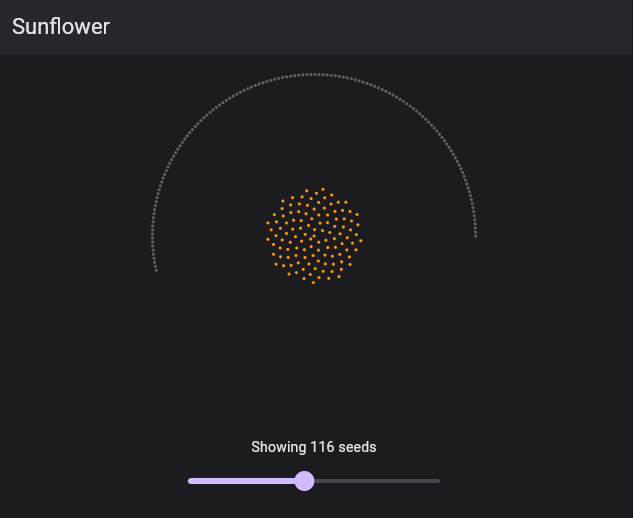
下のスライダによって周りのドットが中央に集まったり、離散したりするアプリである。
今回はこれを解剖して、中身を見ていく。
Warning
有効数字の概念無視します。
コード全文
// Copyright 2019 the Dart project authors. All rights reserved.
// Use of this source code is governed by a BSD-style license
// that can be found in the LICENSE file.

import 'dart:math' as math;

import 'package:flutter/material.dart';

const int maxSeeds = 250;

void main() {
  runApp(const Sunflower());
}

class Sunflower extends StatefulWidget {
  const Sunflower({super.key});

  @override
  State<StatefulWidget> createState() {
    return _SunflowerState();
  }
}

class _SunflowerState extends State<Sunflower> {
  int seeds = maxSeeds ~/ 2;

  @override
  Widget build(BuildContext context) {
    return MaterialApp(
      theme: ThemeData(
        brightness: Brightness.dark,
        appBarTheme: const AppBarTheme(elevation: 2),
      ),
      debugShowCheckedModeBanner: false,
      home: Scaffold(
        appBar: AppBar(
          title: const Text('Sunflower'),
        ),
        body: Center(
          child: Column(
            crossAxisAlignment: CrossAxisAlignment.center,
            children: [
              Expanded(
                child: SunflowerWidget(seeds),
              ),
              const SizedBox(height: 20),
              Text('Showing ${seeds.round()} seeds'),
              SizedBox(
                width: 300,
                child: Slider(
                  min: 1,
                  max: maxSeeds.toDouble(),
                  value: seeds.toDouble(),
                  onChanged: (val) {
                    setState(() => seeds = val.round());
                  },
                ),
              ),
              const SizedBox(height: 20),
            ],
          ),
        ),
      ),
    );
  }
}

class SunflowerWidget extends StatelessWidget {
  static const tau = math.pi * 2;
  static const scaleFactor = 1 / 40;
  static const size = 600.0;
  static final phi = (math.sqrt(5) + 1) / 2;
  static final rng = math.Random();

  final int seeds;

  const SunflowerWidget(this.seeds, {super.key});

  @override
  Widget build(BuildContext context) {
    final seedWidgets = <Widget>[];

    for (var i = 0; i < seeds; i++) {
      final theta = i * tau / phi;
      final r = math.sqrt(i) * scaleFactor;

      seedWidgets.add(AnimatedAlign(
        key: ValueKey(i),
        duration: Duration(milliseconds: rng.nextInt(500) + 250),
        curve: Curves.easeInOut,
        alignment: Alignment(r * math.cos(theta), -1 * r * math.sin(theta)),
        child: const Dot(true),
      ));
    }

    for (var j = seeds; j < maxSeeds; j++) {
      final x = math.cos(tau * j / (maxSeeds - 1)) * 0.9;
      final y = math.sin(tau * j / (maxSeeds - 1)) * 0.9;

      seedWidgets.add(AnimatedAlign(
        key: ValueKey(j),
        duration: Duration(milliseconds: rng.nextInt(500) + 250),
        curve: Curves.easeInOut,
        alignment: Alignment(x, y),
        child: const Dot(false),
      ));
    }

    return FittedBox(
      fit: BoxFit.contain,
      child: SizedBox(
        height: size,
        width: size,
        child: Stack(children: seedWidgets),
      ),
    );
  }
}

class Dot extends StatelessWidget {
  static const size = 5.0;
  static const radius = 3.0;

  final bool lit;

  const Dot(this.lit, {super.key});

  @override
  Widget build(BuildContext context) {
    return DecoratedBox(
      decoration: BoxDecoration(
        color: lit ? Colors.orange : Colors.grey.shade700,
        borderRadius: BorderRadius.circular(radius),
      ),
      child: const SizedBox(
        height: size,
        width: size,
      ),
    );
  }
}
解剖
stateful
まず最初のコード。
import 'dart:math' as math;

import 'package:flutter/material.dart';

const int maxSeeds = 250;

void main() {
  runApp(const Sunflower());
}

class Sunflower extends StatefulWidget {
  const Sunflower({super.key});

  @override
  State<StatefulWidget> createState() {
    return _SunflowerState();
  }
}これに関しては特に説明するほどでもない。デフォルトのFlutterのStatefulWidgetを作成しているだけである。
stateクラス
次にこのステートクラス。
class _SunflowerState extends State<Sunflower> {
  int seeds = maxSeeds ~/ 2;

  @override
  Widget build(BuildContext context) {
    return MaterialApp(
      theme: ThemeData(
        brightness: Brightness.dark,
        appBarTheme: const AppBarTheme(elevation: 2),
      ),
      debugShowCheckedModeBanner: false,
      home: Scaffold(
        appBar: AppBar(
          title: const Text('Sunflower'),
        ),
        body: Center(
          child: Column(
            crossAxisAlignment: CrossAxisAlignment.center,
            children: [
              Expanded(
                child: SunflowerWidget(seeds),
              ),
              const SizedBox(height: 20),
              Text('Showing ${seeds.round()} seeds'),
              SizedBox(
                width: 300,
                child: Slider(
                  min: 1,
                  max: maxSeeds.toDouble(),
                  value: seeds.toDouble(),
                  onChanged: (val) {
                    setState(() => seeds = val.round());
                  },
                ),
              ),
              const SizedBox(height: 20),
            ],
          ),
        ),
      ),
    );
  }
}
int seeds = maxSeeds ~/ 2;これは、seeds変数にmaxSeedsを2で割った値を入れている。
これは動きとコードから察するに、初期値が半分であることの証左である。
少しコードを飛ばして、
child: Column(
	crossAxisAlignment: CrossAxisAlignment.center,
	children: [
	  Expanded(
		child: SunflowerWidget(seeds),
	  ),
	  const SizedBox(height: 20),
	  Text('Showing ${seeds.round()} seeds'),
	  SizedBox(
		width: 300,
		child: Slider(
		  min: 1,
		  max: maxSeeds.toDouble(),
		  value: seeds.toDouble(),
		  onChanged: (val) {
			setState(() => seeds = val.round());
		  },
		),
	  ),
	  const SizedBox(height: 20),
	],
),Columnウィジェット配下にExpandedウィジェットでSunflowerWidget(seeds)なるものが配置されている。
後述
さらに子要素には、Textウィジェットでseedの数を表記。
その子要素には、SliderウィジェットでsetStateを使用して数を調整できるようにしている。
SunFlowerWidget
class SunflowerWidget extends StatelessWidget {
  static const tau = math.pi * 2;
  static const scaleFactor = 1 / 40;
  static const size = 600.0;
  static final phi = (math.sqrt(5) + 1) / 2;
  static final rng = math.Random();

  final int seeds;

  const SunflowerWidget(this.seeds, {super.key});

  @override
  Widget build(BuildContext context) {
    final seedWidgets = <Widget>[];

    for (var i = 0; i < seeds; i++) {
      final theta = i * tau / phi;
      final r = math.sqrt(i) * scaleFactor;

      seedWidgets.add(AnimatedAlign(
        key: ValueKey(i),
        duration: Duration(milliseconds: rng.nextInt(500) + 250),
        curve: Curves.easeInOut,
        alignment: Alignment(r * math.cos(theta), -1 * r * math.sin(theta)),
        child: const Dot(true),
      ));
    }

    for (var j = seeds; j < maxSeeds; j++) {
      final x = math.cos(tau * j / (maxSeeds - 1)) * 0.9;
      final y = math.sin(tau * j / (maxSeeds - 1)) * 0.9;

      seedWidgets.add(AnimatedAlign(
        key: ValueKey(j),
        duration: Duration(milliseconds: rng.nextInt(500) + 250),
        curve: Curves.easeInOut,
        alignment: Alignment(x, y),
        child: const Dot(false),
      ));
    }

    return FittedBox(
      fit: BoxFit.contain,
      child: SizedBox(
        height: size,
        width: size,
        child: Stack(children: seedWidgets),
      ),
    );
  }
}
まずは変数宣言から
  static const tau = math.pi * 2;
  static const scaleFactor = 1 / 40;
  static const size = 600.0;
  static final phi = (math.sqrt(5) + 1) / 2;
  static final rng = math.Random();

final int seeds;tauは円周率の2倍を代入。
scaleFactorはを代入。変数名から大きさの係数を制御していると思われる。
sizeはフラワーの大きさを制御。
phiはを代入している。これは黄金比である。
20240429121219-TalkWithAI-phind-Log-これはどういうことだと思いますか static final phi = (math.sqrt(5) + 1) / 2;
phiに関してはかなりアバウトな数字でも何ら影響は及ぼさないらしい。
この定数は、視覚的な美しさや均衡を表現するのによく使用される。
rngはランダムな数字を代入している。
seedsはコンストラクタで代入され、おそらくドットの個数を指す。
staticとついているのは、これらを静的な変数にするため。
Tip
特に、複数のインスタンスを生成するクラスでは、
staticを使用することでメモリを節約できる。
publish: false
final seedWidgets = <Widget>[];クラスットをDartのList型で定義している。
for (var i = 0; i < seeds; i++) {
  final theta = i * tau / phi;
  final r = math.sqrt(i) * scaleFactor;

  seedWidgets.add(AnimatedAlign(
	key: ValueKey(i),
	duration: Duration(milliseconds: rng.nextInt(500) + 250),
	curve: Curves.easeInOut,
	alignment: Alignment(r * math.cos(theta), -1 * r * math.sin(theta)),
	child: const Dot(true),
  ));
}このコードはDartのfor文でseedsの数だけ繰り返して、seedWidgets変数に円からサンフラワーに遷移する際のAnimatedAlignウィジェットを格納している。
  final theta = i * tau / phi;
final r = math.sqrt(i) * scaleFactor;thetaには、
という式が入り、角度を表す。
これは、の時に、
となる。
後にこの数字は、座標としてやとして使用されるので、
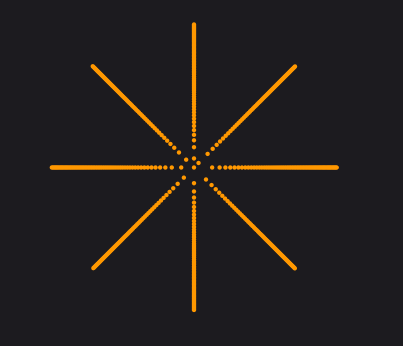
この図でいう、の位置、即ち左真横線上の座標になる。
この図はを8にしているのでこのような図になる。
rには、
という半径を表す式になる。中心からどのくらいDotが離れるかを表す。

seedWidgets.add(AnimatedAlign(
	key: ValueKey(i),
	duration: Duration(milliseconds: rng.nextInt(500) + 250),
	curve: Curves.easeInOut,
	alignment: Alignment(r * math.cos(theta), -1 * r * math.sin(theta)),
	child: const Dot(true),
));このコードでは、AnimatedAlignウィジェットを使用している。
| コンストラクタ | 動作 |
|---|---|
key | 一意なIDを作成している。 |
duration | ドットが規定位置から円周上に移動するまでの時間を定義している。 ここでは、最低250msはかかるようになっている。 |
curve | アニメーションカーブの定義 - easeInOut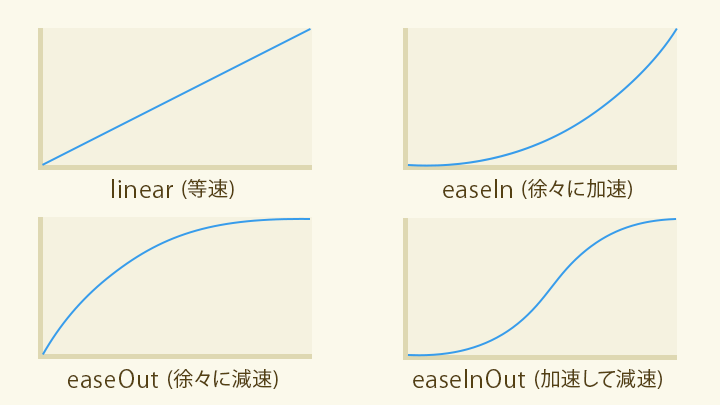 |
alignment | 絶対座標の定義 |
child | Dotウィジェット |
alignmentだが、これを見やすいようにすると、 |
となる。
yに対してマイナスがかかっている理由はよくわからなかった。
これをプラスにしても目に見えるような動作の変化はなかった。
publish: false
for (var j = seeds; j < maxSeeds; j++) {
  final x = math.cos(tau * j / (maxSeeds - 1)) * 0.9;
  final y = math.sin(tau * j / (maxSeeds - 1)) * 0.9;

  seedWidgets.add(AnimatedAlign(
	key: ValueKey(j),
	duration: Duration(milliseconds: rng.nextInt(500) + 250),
	curve: Curves.easeInOut,
	alignment: Alignment(x, y),
	child: const Dot(false),
  ));
}このコードはDartのfor文でseedsの数だけ繰り返して、seedWidgets変数にサンフラワーから円に戻るときのAnimatedAlignウィジェットを格納している。
基本的には上述したコードとほぼ一致している。
変更されている点は、絶対座標の計算方法である。
final x = math.cos(tau * j / (maxSeeds - 1)) * 0.9
final y = math.sin(tau * j / (maxSeeds - 1)) * 0.9
見やすくすると以下のとおりである。
0.9はただ円の大きさを調整しているだけ。(以後円サイズ調整係数)
これも、として計算すると、
となる。
座標計算の結果
つまり、16番目に生成されたドットはの条件の時に、
サンフラワーでは、の位置、
円周上では、の位置になる。
アクティベートすることによって、これらの位置を交互に移動する。
return FittedBox(
  fit: BoxFit.contain,
  child: SizedBox(
	height: size,
	width: size,
	child: Stack(children: seedWidgets),
  ),
);FittedBoxウィジェットでサイズを制限して、seedWidgetsの中身をStackウィジェットで重ねわせられるように記述している。
特にいうことはない。
Dot
class Dot extends StatelessWidget {
  static const size = 5.0;
  static const radius = 3.0;

  final bool lit;

  const Dot(this.lit, {super.key});

  @override
  Widget build(BuildContext context) {
    return DecoratedBox(
      decoration: BoxDecoration(
        color: lit ? Colors.orange : Colors.grey.shade700,
        borderRadius: BorderRadius.circular(radius),
      ),
      child: const SizedBox(
        height: size,
        width: size,
      ),
    );
  }
}このDotクラスは特にいうことはない。
サイズと色を指定しているだけである。
