honox式DI
honoでDIする時にも、hono式DIのように、Variablesを使用することができる。
ただし、honoxにはhonoのように、Hono()インスタンスを作ることがないので、DIの仕方は若干異なる。簡単に言うと、作成したVariablesをmiddlewareとして、使用する形
手順
middleware
まず、Variablesを作成する。
export type DiEnv = {
  Variables: {
    downloadFileUsecase: DownloadFileUsecase;
  };
};
そこで、必要なリポジトリをインスタンス化する。
const fileRepo = new FileRepositoryImpl();そして、DIされるクラスをインスタンス化する。ここでDIする。
const downloadFileUsecase = new DownloadFileUsecase(fileRepo);middlewareを定義する。この際、createMiddlewareにジェネリクスとして、Variablesを定義する。context(このコードではc変数)を介して、エンドポイントで必要なクラスをセットする。
export const diMiddleware = createMiddleware<DiEnv>(async (c, next) => {
  c.set("downloadFileUsecase", downloadFileUsecase);

  await next();
});
全体をまとめるとこうなる。
export type DiEnv = {
  Variables: {
    downloadFileUsecase: DownloadFileUsecase;
  };
};

const fileRepo = new FileRepositoryImpl();

const downloadFileUsecase = new DownloadFileUsecase(fileRepo);

export const diMiddleware = createMiddleware<DiEnv>(async (c, next) => {
  c.set("downloadFileUsecase", downloadFileUsecase);

  await next();
});自分の場合は、画像のように、_di_middlewareというのを定義して、
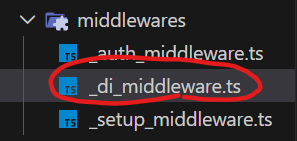
app/routes/の_middlewareでexportしている。
import { authMiddleware } from "../middlewares/_auth_middleware";
import { diMiddleware } from "../middlewares/_di_middleware";

export default [diMiddleware, authMiddleware];
エンドポイント側
エンドポイント側でcreateRouteを使用するときに、第一引数にexportしたdiMiddlewareを記述する。
export const GET = createRoute(
	diMiddleware,
	async (c) => {
		...
	}
)このエンドポイント内では、context(c変数)を使用して、c.setしたクラスにアクセスすることができる。
const usecase = c.get("downloadFileUsecase");
const result = await usecase.execute(path);
といった形。
contextを使用するのはhono式DIとそこまで変わりませんね。
おわり
おわり、多分もっといい方法がある気がする。
絶対DIコンテナライブラリがある気がする!
